Why Your Discord Server Has Too Many Channels
More channels don't always make a better Discord server. Learn why overcrowded server layouts can hurt engagement, overwhelm new members and make communities feel inactive — and how to build a simpler structure that works.
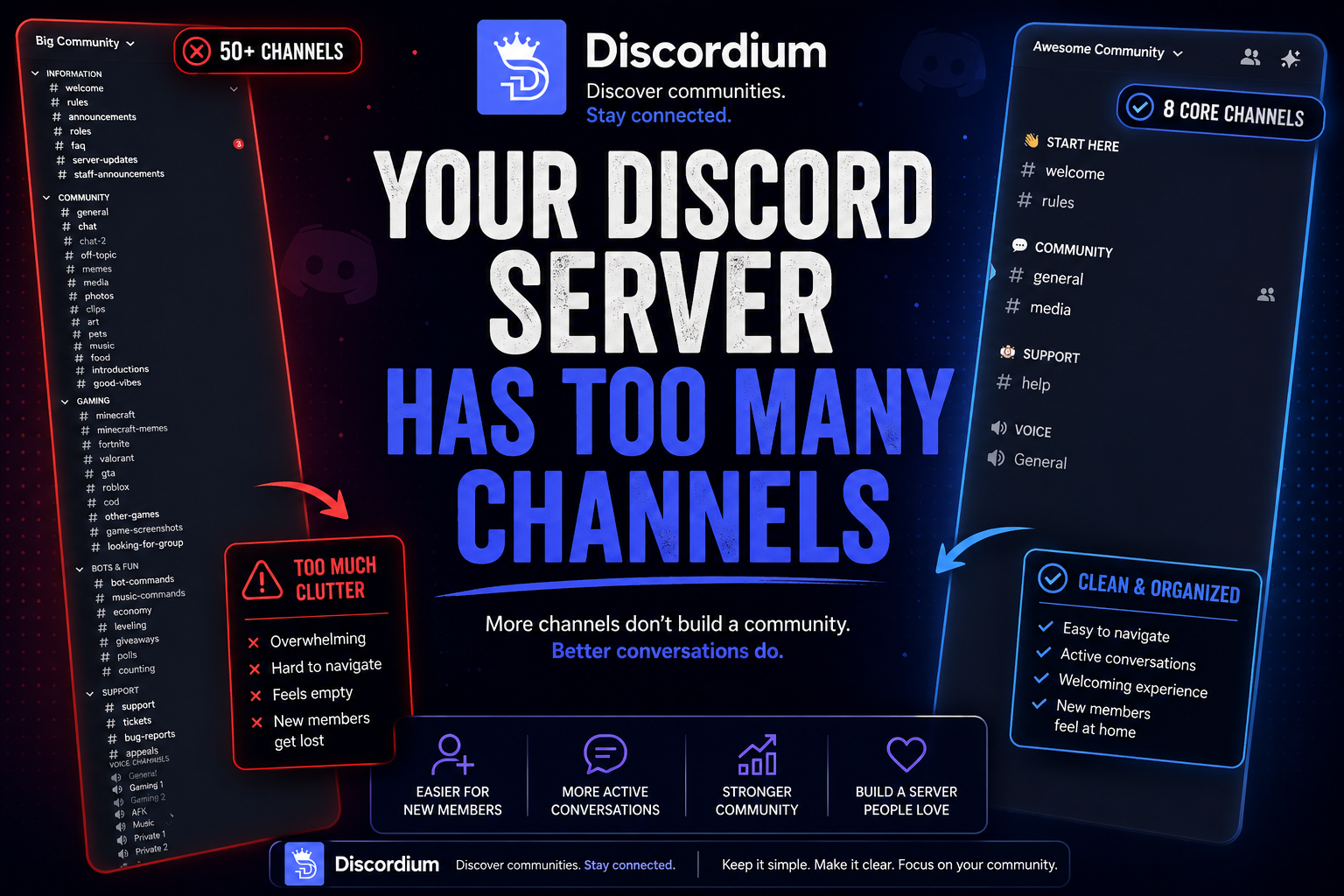
More channels don't make a better community. Sometimes, they make your Discord server feel emptier than it actually is.
When creating a new Discord server, adding channels feels productive.
You create #general.
Then #memes.
Then gaming, media, music, screenshots, clips, pets, suggestions, introductions, commands, support, off-topic — and suddenly your new community has 40 channels and 15 members.
Everything looks organized.
But there's a problem:
Almost every channel is empty.
For new members, that can make the entire community feel inactive, confusing and unfinished.
A good Discord server isn't the one with the most channels.
It's the one where members immediately understand where to go, where to talk and what to do.
1. The 50-Channel Problem
Imagine joining a new community.
You open the server and immediately see:
INFORMATION
#welcome#rules#announcements#roles#faq
COMMUNITY
#general#chat-2#off-topic#memes#media#photos#clips#music
GAMING
#minecraft#fortnite#valorant#roblox#gta#other-games
And that's only part of the server.
For the owner, this might look impressive.
For someone who joined 30 seconds ago, there's another question:
Where am I supposed to talk?
More options don't always make something easier to use.
Sometimes they create decision overload.
2. Think Like a New Member
Server owners have a major disadvantage when evaluating their own server:
They already know how everything works.
You know why #community-chat exists.
You know the difference between #general, #off-topic and #random.
You know which channel people actually use.
A new member doesn't.
They're trying to understand:
- What is this community?
- Where are the people?
- Where can I talk?
- What should I do first?
If answering those questions requires exploring 15 categories, your onboarding experience may be too complicated.
Your server structure should make the answers obvious.
3. Don't Confuse Complexity With Community
Consider this onboarding experience:
- 12 categories
- 47 text channels
- 8 voice channels
- 20 roles
- 3 verification steps
- 6 bot messages
- A massive rules page
The member hasn't even said hello yet.
Complex systems can be useful for large communities, but adding them before they're needed creates unnecessary friction.
A small server doesn't need to look like a community with 100,000 members.
It needs to work for the members it actually has.
Complexity ≠ Community
Build for your current community first.
Scale the structure when the community requires it.
4. Empty Channels Make Your Server Feel Dead
Imagine a server with 50 channels.
Only three receive messages regularly.
Members browsing the server repeatedly encounter channels where the last message was:
- 4 days ago
- 2 weeks ago
- 1 month ago
Even if #general is active, the overall impression can become:
This server is dead.
Now imagine the same amount of activity concentrated into eight channels.
Suddenly, members regularly encounter new conversations.
The server feels much more active.
Nothing changed about the number of members.
You simply stopped spreading their activity across unnecessary spaces.
5. Every Channel Splits the Conversation
Suppose your community has 20 active people.
If most people talk in #general, conversations naturally overlap.
Someone posts a meme. Another person talks about gaming. Someone asks a question. Other members respond.
The channel feels alive.
Now divide those same people across:
#general •
#gaming •
#memes •
#random •
#media •
#clips •
#technology •
#music •
#movies •
#food
You haven't created more activity.
You've simply divided the activity you already had.
Channels don't create conversations.
People create conversations.
Channels should organize existing activity — not attempt to manufacture activity that doesn't exist yet.
6. Start Small
A new community usually doesn't need an enormous structure.
A basic server could start with:
👋 START HERE
#welcome#rules
💬 COMMUNITY
#general#media
🛟 SUPPORT
#help
🔊 VOICE
General
That's enough for many new communities.
You can always expand later.
Start simple. Grow when needed.
7. Don't Create Channels for Conversations That Don't Exist
This happens frequently.
An owner thinks:
“People might want to talk about movies.”
So they create #movies.
Then:
“Maybe people like anime.”
So #anime appears.
Then gaming:
#gaming → #minecraft → #valorant → #fortnite
But nobody asked for them.
The server is being designed around possible future conversations rather than actual member behavior.
Let conversations happen naturally.
If members regularly discuss Minecraft in #general, creating #minecraft might eventually make sense.
If members constantly share artwork, perhaps #art deserves its own space.
Demand should create the channel — not the other way around.
8. When Should You Add a New Channel?
Is this topic appearing regularly?
If people mention something once every two weeks, it probably doesn't need a dedicated channel.
Is it taking over another conversation?
If one topic constantly dominates #general, separating it may improve both conversations.
Will multiple members use it?
Creating a channel for two people usually isn't necessary.
Does the channel have a clear purpose?
Members should understand what belongs there without reading a paragraph explaining it.
Could an existing channel handle it?
If yes, use the existing channel.
The best channel structures aren't created all at once. They evolve alongside the community.
9. Categories Can Become a Problem Too
Channels aren't the only source of clutter.
Categories can create the same problem.
A server might have:
- WELCOME
- INFORMATION
- IMPORTANT
- COMMUNITY
- SOCIAL
- FUN
- GAMING
- MEDIA
- BOTS
- SUPPORT
- STAFF
- VOICE
Technically, everything is organized.
Practically, members are navigating a filing cabinet.
Categories should help users understand the server.
If they make navigation more complicated, they're doing the opposite of their job.
10. Bot Channels Are Often Overused
A server installs several bots and suddenly has:
#bot-commands •
#music-commands •
#leveling •
#economy •
#tickets •
#logs •
#giveaways
Ask whether members actually need to see all of these.
Administrative bot output can often remain hidden from regular members.
Multiple command channels may be unnecessary.
Bots should support the community, not dominate its navigation.
11. Voice Channels Have the Same Problem
Ten empty voice channels don't make a server look active.
They make it look empty ten times.
For a smaller community, you might only need:
- 🔊 General
- 🎮 Gaming
- ➕ Create Your Own
As activity increases, permanent voice channels can be added based on actual usage.
Build around behavior, not hypothetical demand.
12. What About Large Communities?
Large communities are different.
A server with thousands of active members may genuinely need dozens of channels.
Different games might require dedicated areas. Support requests might need separate systems. Regional communities may need language-specific spaces.
The point isn't:
“Never have lots of channels.”
The point is:
Every channel should justify its existence.
If hundreds of people regularly use a channel, keep it.
If nobody has posted there for months, ask why it's still there.
13. Archive Instead of Delete
Sometimes a channel contains valuable history.
Deleting it isn't always necessary.
You can archive old channels or make them read-only.
For example:
#summer-event-2026
After the event ends, move it into an archive category or restrict new messages.
This works well for:
- Old events
- Completed competitions
- Previous announcements
- Retired projects
- Seasonal channels
- Historical community content
Keep active areas focused on what's happening now.
14. Your Server Should Change Over Time
A Discord server isn't a finished product.
Your community changes. Its interests change. Activity changes. Members come and go.
Your server structure should adapt too.
Every few months, ask:
- Is this channel still being used?
- Does this need its own channel?
- Could these channels be merged?
- Is this category still useful?
- Would a new member understand this structure?
Server cleanup isn't a sign that something went wrong.
It's normal community maintenance.
A Simple Discord Server Cleanup Checklist
- Identify inactive channels. Look for areas with little or no meaningful activity.
- Find duplicate purposes. Ask whether channels such as
#general,#chatand#randomreally need to be separate. - Merge where appropriate. Concentrate conversations instead of splitting them.
- Simplify categories. Reduce unnecessary navigation.
- Review bot channels. Remove public bot areas that aren't actually needed.
- Review permissions. Make sure members aren't seeing administrative areas unnecessarily.
- Archive old content. Preserve history without cluttering active spaces.
- Ask your members. They may identify confusing areas faster than the people who built the server.
Fewer Channels Can Mean More Activity
There's a strange psychological effect when building Discord servers.
Adding things makes the server feel like it's improving.
Another bot. Another role. Another category. Another channel.
But sometimes the best improvement is removing something.
A smaller structure concentrates activity.
Concentrated activity creates conversations.
Conversations make the community feel alive.
And active communities encourage new members to participate.
That's far more valuable than an impressive-looking sidebar.
Build for People, Not for the Sidebar
Your Discord server doesn't need to look huge.
It needs to feel welcoming.
New members shouldn't need a map to find #general.
Existing members shouldn't have to check 30 channels to follow conversations.
And empty channels shouldn't outnumber active ones.
Start small. Watch how people actually use your community. Add structure when there's a reason for it. Remove structure when it stops being useful.
The best Discord server isn't necessarily the most complicated one. It's the one people actually enjoy using.
Discordium — Discover communities worth joining.